Tuesday, January 17, 2012

DSLR Photography: Understanding Aperture

I have been getting quite a few emails and comments asking about my photographs (thank you!). A lot of you want to to know what type of camera I use and would like for me to share some photography tutorials. I have added additional lenses to my arsenal since I posted about my camera, but you can find out some of what I use here. I appreciate all of your feedback. I am still fairly new to photography myself, but would be happy to share some of the things that I have learned with you.

I use a Canon - therefore, the tutorials posted here will mostly be geared towards Canon users.

The goal of these tutorials will be to get you to move out of auto mode, and to gain some creative control over your images by using manual and semi-manual modes.

Photography literally translates to, "To draw with light". Learning how to work with light is critical to create a successful photograph. There are three main camera settings that control light and must be balanced in order to get a properly exposed photograph; ISO, aperture and shutter speed. Today we will discuss aperture.


Exposure is indicated by the exposure meter in the middle of your LCD screen (circled in red below) or along the bottom when you look through the camera's viewfinder and hold the shutter button half way down.


Notice that the exposure indicated above is in line with the zero (the small rectangle below the 0). This tells us that the photo about to be taken will be properly exposed. As you head into the +1/+2 range your photograph could turn out too bright and will be considered overexposed. As you head into the -1/-2 range your photo could be too dark and considered underexposed. In some situations you may want to over or under expose an image, but for the sake of a beginner lesson, do your best to line up with the zero. By learning the exposure triangle and all of it's components, you will be able to get a perfectly exposed image.

Today, we will focus on learning aperture.

Aperture (f-stop): Aperture is the size of the opening in a lens that allows light to pass through it and into the camera. By controlling your aperture, you can determine how much light reaches the camera's sensor. Think of an aperture as a circle that can open wide or close to a small size. When opened wide, the aperture can let in a lot of light. When tightened to be small, the aperture lets in very little light. The size limit of the aperture is determined by which lens is being used.

Another important feature of aperture is that it controls the depth of field. Depth of field is how much of your image is in focus. Many people new to the DSLR world are especially enamored with the ability to blur a background, but to keep a specific point in focus. This is controlled by the size of the aperture (as well as the focal length and distance from your subject - which I will cover in a future post). To get a shallow depth of field (blurred background) the aperture opening will need to be large and opened wide (small f-stop number). To get a large depth of field (i.e. for a landscape where you would want everything to be in focus) the aperture opening would need to be rather small (large f-stop number).

To set the aperture, you will select an f-stop number. One of the more confusing aspects of aperture is that the smaller the f-stop number, the larger the actual opening of the aperture is and vice versa (the larger the f-stop number is, the smaller the actual opening of the aperture is).

You may need to check your camera's manual to find out how to change the aperture on your model - but, I will show you how it works on my camera model.

To change your aperture, put your camera into manual mode (m on the mode dial). Hold down the Av button (located to the right of  your LCD screen) while turning the front dial (located directly above your shutter button). You should see the number preceded by an F change when you do this. You can view this through your viewfinder or on your LCD screen.


Review: While in manual mode (M) hold down Av button  and turn the front dial. You should see the number proceeded by an F change.

DSLR cameras also offer semi-manual modes, which I think are a great way for beginners to learn how to control their cameras. A semi-manual mode that allows you to have control over aperture is the aperture priority mode or Av (A on Nikon) on your mode dial.


The aperture priority mode allows you to select your aperture and ISO while the camera compensates by setting the shutter speed for you, to get a properly exposed image. When in aperture priority mode, the front dial will now change your aperture, and you will no longer need to hold down the Av button.

Before this post gets out of control long (I may have already crossed that line), there is one more thing that I would like to share with you. Be aware that the lens that you choose determines how large your aperture can be. This is indicated in the name of your lens. For example, many beginners may use an 18-55mm f 3.5- f 4.6 lens. What this means is that when you are zoomed all the way out (18mm) your maximum aperture size is 3.5 and when you are zoomed all the way in (55mm) your maximum aperture size is 4.6.

When I first got my camera, I found that the kit lens that came with my camera did not allow me to get the background blur that I wanted to achieve in my photos. If I can recommend one thing for every beginner to purchase, it would be this lens (Nikon has a version as well). It is one of the least expensive lenses out there and allows you to open your aperture all the way to 1.8. You can't find a faster lens for the price! Also, it is the perfect lens to learn on and to be creative with without breaking the bank.

Our next lesson will be about shutter speed. In the meantime, practice using aperture. Take photos of the same subject at different f-stops and get a feel for what it does to your photos.

I hope that you found this tutorial helpful. Please feel free to comment or email me at brhea.koneman@gmail.com with any questions that you have. Now, get snapping!

Sunday, January 15, 2012

Recipe: Bananas Foster Pancakes

Every once in a while I will cook something over the weekend that just can't wait until Monday to make an appearance on the blog. The recipe for these insanely delicious bananas foster pancakes needed to be shared ASAP.

I found the inspiration for this recipe from one of my favorite food blogs, Closet Cooking. Both a Bisquick and a from-scratch recipe are listed below.


Ingredients:
Pancakes:
1 cup all purpose flour
1 tsp baking powder
1/4 tsp salt
1 cup milk
1 egg
2 tsps cinnamon
2 overripe bananas (peeled and mashed)
Sauce:
1/4 tsp cinnamon
2 tbsps brown sugar
2 tbsps unsalted butter (melted)
2 ripe bananas (peeled and sliced)
2 ounces dark rum

Directions:
1. Mix the dry ingredients (flour, baking powder, salt and cinnamon) in a large bowl.
2. Mix the wet ingredients (milk, egg, sugar, butter and bananas) in another bowl.
3. Add the wet ingredients to the dry ingredients slowly. Making sure not to over mix.
4. Heat pan and melt about half a tbsp of butter in it.
5. Pour a little less than 1/4 cup of the batter into the hot pan and heat until the edges start to look dry and the surface starts to bubble (about 2-3 minutes).
6. Flip the pancake and cook the other side until the bottom is golden brown (about 1-2 minutes).
7. Meanwhile, melt the butter in a separate pan (I had mine on a medium high heat about a 6-7 on a scale of 1-10).
8. Add the brown sugar and cinnamon and let the mixture come to a simmer.
9. Add the bananas and cook until caramelized on both sides (about 3 minutes on each side).
10. Add the rum and simmer (about a minute).

Top the pancakes with the sauce and serve while hot.

To use Bisquick:
1.) Follow recipe on Bisquick box (2 cups Bisquick, 1 cup milk, 2 eggs)
2.) Add 1 tbsp sugar.
3.) Add 1 tsp vanilla.
3.) Add 1 tsp cinnamon.
4.) Add 2 overripe mashed bananas and mix together.
5.) Pour 1/4 cup of the mixture into the pan and heat until the edges start to look dry and the surface bubbles.
6.) Flip and heat opposite side for about 2-3 minutes.

Follow instructions above for sauce.


If you are looking for a way to amp up your typical pancake recipe, look no further. Enjoy!

Thursday, January 12, 2012

Seize the Weekend

Fridays are full of promise and anticipation. After all, the weekend is mere moments away. Two perfect little days for you to stake your claim on. Let's all procrastinate at work daydream together about what the upcoming weekend has in store for us. Below are five projects/recipes/crafts that are easy to tackle in a weekend. Hey, I've already done the legwork for you - so no excuses, seize the weekend.

1.) Make a decadent breakfast for someone special. I am sure your loved ones would appreciate this pile of deliciousness.

Banana nut french toast via my main woman, Martha Stewart. Recipe here.

2.) Learn how to make paper roses. These could even be used as Valentines (who doesn't love handmade?).

 For a detailed tutorial on how to make your own, head on over to Heart of Light.

3.) Get a jazzed up manicure like this one, via Emily Schuman of Cupcakes & Cashmere


4.) Make an unusual salad for lunch/dinner (linner?). After all, this girl seems to be really enjoying herself.

Tangled Thai Salad found on Pinterest recipe here.

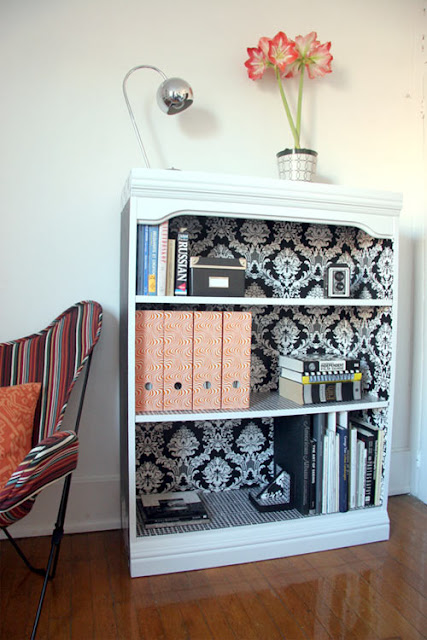
5.) Update a boring bookshelf or built-in (say that five times fast) using contact paper or wallpaper.

Found on Pinterest originally posted on Apartment Therapy. How-to found here.

I hope you all have a wonderful weekend with just the right amount of productivity!

Tuesday, January 10, 2012

Recipe: Deconstructed Lasagna Soup

The cold that I had last week has now moved on to my husband. I thought a homemade soup might do some good for our sick selves. I found a recipe for Lasagna Soup on closetcooking.com, and it was simply perfect. I normally find myself tweaking recipes or adding some ingredients for more flavor, but Kevin of Closet Cooking really knocked this one out of the park. Follow the steps below for a satisfying and comforting soup that is sure to make you come back for seconds.


Ingredients

  • 1 tablespoon olive oil
  • 1 pound Italian sausage, casings removed
  • 1 onion, diced
  • 2 cloves garlic, chopped
  • 1/2 teaspoon red pepper flakes
  • 1/2 teaspoon fennel seeds, crushed
  • 4 cups chicken broth
  • 1 (28 ounce) can diced tomatoes
  • 2 tablespoons tomato paste
  • 1 teaspoon oregano
  • 1 bay leaf
  • salt and pepper to taste
  • 1/2 pound pasta
  • 4 ounces ricotta
  • 1/2 cup grated parmesan
  • 2 cup mozzarella, shredded
  • 1 handful basil, chopped
Instructions:
  1. Heat the oil in a large sauce pan over medium heat.
  2. Add the sausage (to remove casings simply cut a long line down the center and they should peel right off) and cook until lightly browned, about 10 minutes, breaking it apart as you go. Set aside.
  3. Add the onion and saute until tender, about 5-7 minutes.
  4. Add the garlic, red pepper flakes and fennel and saute until fragrant, about 1-2 minutes.
  5. Add the chicken broth, tomatoes, tomato paste, oregano, bay leaf, salt and pepper, bring to a boil, reduce the heat and simmer for 30 minutes. (Once finished remove bay leaf)
  6. Add the pasta and cook until al dente, about 7 minutes and remove from heat. Once pasta is cooked add the sausage back in. 
  7. Mix the ricotta, parmesan and mozzarella and serve the soup garnished with a tablespoon of the mixture along with the basil. 

Enjoy!

Sunday, January 8, 2012

A Hoarding Intervention

This weekend was full of cleaning and organizing. Jake had a honey-do list a mile long and for the majority of Saturday I was busy digging myself out of some crazy clutter that had piled up. I've been sick for the past few days and with the rush of the holidays (excuses excuses) our house has been looking a little less than tidy.  When things aren't organized I start to go a little cray-cray, so this weekend was necessary for my sanity.

I could no longer find my computer on my desk. Our linen closet was shoved full of everything that I didn't feel like finding a place for. It was time for an intervention. I posted some pics, not only to show you the real side of my life, but also to have you all keep me accountable. One day it's a messy desk - and the next we're buried in 15 years of newspapers with stray cats running around our house. Does anyone else get anxiety watching Hoarders? Don't even get me started on animal hoarders.

     (my desk, located in a nook in our upstairs hallway - the opening overlooks the downstairs/foyer)

Aaaah, sanity has been restored.

Speaking of hoarders, this video made me laugh - in my opinion, this is a completely acceptable form of hoarding ;)

Ice Cream Inspired Cookies

My plan was to post this tomorrow, but the cookies were so good I couldn't wait to share. Both cookie recipes were inspired from popular ice cream flavors. I made a cookies & cream cookie (with crushed Oreos) and a mint chocolate chip cookie (with Andes mints). They were both delish, but the mint chocolate chip is now one of my all time favorite cookie recipes. No surprise, it was the winning Betty Crocker recipe in 2010.


Cookies & Cream Chocolate Chip Cookies
I found this recipe here from the fabulous blog, lovintheoven.com

Ingredients:

1 stick softened butter 
6 Tablespoons sugar 
6 Tablespoons brown sugar 
1 egg 
1 teaspoon vanilla 
1 ¼ cup flour 
½ teaspoon baking soda 
½ teaspoon salt 
11 Oreo Cookies broken into pieces
1 cup chocolate chips (after trying this recipe I think white chocolate chips might be even better)

Instructions:
Preheat oven to 350°F Mix butter, and sugars until well combined. Add egg and vanilla until mixed well.
Place flour, baking soda and salt into a large bowl, stir to combine. Slowly add dry ingredients to wet ingredients combine well. Gently stir in broken oreos (hint: put oreos in a large ziplock bag to crush them without the mess) and chocolate chips until combined.
With a medium cookie scoop, scoop onto baking sheet. Bake for 10 minutes. Let cool on baking sheet for 3 minutes before transferring to cooling rack.

Mint Chocolate Chip Cookies

Ingredients:

1 pouch (1 lb 1.5 oz) Betty Crocker sugar cookie mix (this is a powdered mix - you can substitute this for your favorite sugar cookie recipe from scratch and simply add the mint extract, food coloring, chocolate chips and Andes mints)
1/2 cup butter or margarine, softened
1/2 teaspoon mint extract
8 drops green food coloring
1egg
1 cup creme de menthe baking chips (I used coarsely chopped Andes mints)
1cup semisweet chocolate chunks

Instructions:
Heat oven to 350°F. In large bowl, stir cookie mix, butter, extract, food color and egg until soft dough forms. 
Stir in creme de menthe baking chips and chocolate chunks. 
Using medium cookie scoop, drop dough 2 inches apart on ungreased cookie sheet.  
Bake 8 to 10 minutes or until set. Cool 3 minutes; remove from cookie sheet to wire rack. 
Enjoy!

Tuesday, January 3, 2012

DIY: Cafe Corner

There has been a corner of our kitchen that's been crying out for some serious TLC. Per usual, the Pinterest gods answered my prayers with a fun and easy way to spruce up our sad little corner. I saw this pin that was originally pinned from here - and the lightbulb went on!

I decided to take our coffee pot and single cup coffee maker and relocate them to create a cafe corner. This was doubly awesome because it freed up counter space (where the coffee maker once sat) and cabinet space (where the mugs and cream and sugar used to be).

I bought the ledge with hooks (which fit my favorite teas perfectly) at Homegoods and the wall letters are from Hobby Lobby.

The before picture below was taken when we still had all of the beautiful holiday cards that we received on display in the arched entryway of our kitchen.

The best part, was enjoying my first cup of coffee from our no longer sad cafe corner.

Back to Top